Finding the Best Learning Management Systems for Your Courses
Finding the Best Learning Management Systems for Your Courses
Finding the Best Learning Management Systems for Your Courses
Feb 10, 2026
Feb 10, 2026
Feb 10, 2026

Finding the right learning management system is about more than just features. It’s about finding a platform that lets you build a real business, protect your work, and scale without hitting frustrating limits. For creators who care deeply about owning their brand and using smart, AI-driven tools, a platform like Skolasti is a game-changer. Others, like Teachable or Kajabi, bring different strengths to the table for different kinds of creators. This guide will help you look past the marketing noise to find what truly fits your vision.
How to Choose Your Ideal Learning Management System
Picking an LMS isn't just a technical choice; it's a foundational business decision. With the online education space booming, your platform can either be a launchpad for your growth or a ceiling that holds you back. Think of this guide as your strategic framework for making that call, where we'll analyse the top platforms through the lens of what creators actually need to succeed.
We’re going to skip the surface-level comparisons and give you advice you can act on. Whether you’re a solo edupreneur launching your first course or a growing academy ready to scale, understanding the subtle differences between these systems is what matters. Our goal is to help you match an LMS’s DNA to your unique teaching style and business model.
Understanding the Market and Core Needs
The explosion in digital education is impossible to ignore. Just look at the numbers: the India Learning Management System market, valued at USD 751.80 million, is on track to hit an incredible USD 3,018.06 million by 2033. This isn't just a statistic; it's a massive green light for independent coaches and creators. You can dig into more of this data on the Indian LMS market at IMARC Group.
But with growth comes competition, making your platform choice more critical than ever. Here’s what you should be evaluating, no exceptions:
Brand Control: Can you make the platform completely yours with full white-labelling, or will you always be promoting someone else's brand?
Content Security: How serious is the platform about protecting your intellectual property? Are they offering real safeguards against piracy and unauthorised sharing?
Student Engagement: What tools are built-in to keep your learners hooked, participating, and actually finishing your courses?
Scalability: Will this platform grow with you? Can it handle your first 100 students just as well as your first 10,000?
A Quick Comparison Framework
To cut through the complexity, we’ll stack up the leading options against the criteria that directly impact your bottom line and your sanity. This way, you can see where each platform truly shines—or falls short.
Criteria | Skolasti | Teachable | Kajabi | Thinkific |
Primary Focus | White-label academy with AI support | Simple course hosting | All-in-one marketing & sales | Versatile course creation |
White-Label | Full (custom domain & branding) | Partial (on higher plans) | Yes | Yes (on higher plans) |
IP Protection | Advanced (DRM, watermarking) | Basic | Basic | Basic |
Ultimately, investing in an LMS is about finding a partner. You need a system that doesn't just host your videos but actively contributes to the success of your academy. To get your content strategy ready, check out our guide on essential tips for creating and selling online courses.
Key Criteria for Evaluating Modern LMS Platforms
Choosing the right learning management system today means looking way beyond a simple feature checklist. A modern LMS shouldn't just host your videos; it needs to be a strategic partner in building your entire educational business. The right platform gives you total control over your brand, locks down your valuable content, and uses smart automation to help you scale without burning out.
Your brand is your single most valuable asset. When students sign up for your academy, the entire experience should feel like it's yours, not like they're on some generic portal owned by a software company. This is where full white-label branding becomes a non-negotiable. It means using your own domain, your logo, and your colours to create a seamless, professional environment that builds trust directly with your audience.
Partial white-labelling, where the platform’s name is still lurking in the URL or footer, is a constant reminder to students that they're on a third-party site. This instantly dilutes your authority and can make your whole operation feel less established. True ownership means every single touchpoint reinforces your brand, not the platform's.
Protecting Your Intellectual Property
Think about it: your course content is the direct result of your expertise and hard work. Protecting it from piracy and unauthorised sharing isn't just a feature; it's fundamental to protecting your revenue. Basic content protection just doesn't cut it anymore. A top-tier LMS has to offer robust intellectual property (IP) protection to secure your business and control how your content is distributed.
Look for platforms that give you multi-layered security. These are the absolute essentials:
DRM (Digital Rights Management): This technology encrypts your video content, making it incredibly difficult for users to download or screen-record it.
Dynamic Watermarking: This is a clever feature that overlays the viewer's user ID or email directly onto the video. It’s a powerful deterrent against sharing because their identity is tied to any recording.
Secure Content Delivery: This ensures your materials are streamed through protected channels, making direct downloads next to impossible.
An LMS without serious IP protection is like a bank with a faulty vault. It might hold your assets, but it offers no guarantee they'll stay yours. Strong security isn't a luxury; it’s a core business requirement for any serious creator.
Scaling Support with AI Automation
As your student numbers grow, so does the admin. Answering the same questions over and over again can eat up hundreds of hours, pulling you away from creating new content or actually marketing your academy. This is where AI-driven tools make a massive difference.
Modern systems, like Skolasti, build in an AI teaching assistant that learns directly from your course materials. It can provide instant, 24/7 answers to student questions by referencing your lessons, PDFs, and videos. This doesn't just give learners a better experience with immediate help; it frees you up to focus on what actually grows the business. It’s like having a dedicated support team you trained yourself, working around the clock.
Finally, you need to think about the business engine. Your LMS must have integrated payment gateways to monetise your expertise without friction, alongside sharp marketing tools and detailed analytics. These are the tools that give you the data-driven insights to understand how your learners behave, how to optimise your courses, and ultimately, how to grow your business effectively. You can learn more about how these features combine to create a powerful platform on our website.
A Detailed Comparison of Top Learning Management Systems
Choosing the right LMS isn't about ticking off feature boxes. It's about digging deeper to understand how each platform really works in the wild—especially when it comes to owning your brand, protecting your content, and supporting your students without burning out. Let's compare four of the biggest names in the game: Skolasti, Teachable, Kajabi, and Thinkific, based on the criteria that actually move the needle for a creator's business.
The opportunity for course creators, particularly in India, is massive and growing fast. According to Grand View Research, the Indian LMS market pulled in USD 1,335.8 million in 2025 and is on track to hit a staggering USD 8,915.6 million by 2033. This growth isn't just about software; it's about the entire ecosystem of services that help creators succeed.
To make a smart choice, I always tell creators to focus on three core pillars: branding, security, and AI.
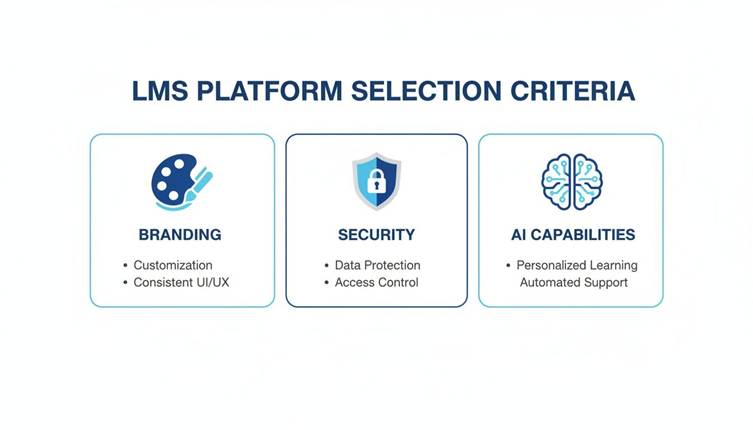
As the infographic shows, it’s the balance between creative control (your brand), asset protection (your content), and operational horsepower (AI and automation) that truly sets the great platforms apart.
LMS Feature Matrix: A Head-to-Head Comparison
To give you a clearer picture, I've put together a quick comparison table. This isn't just about what features exist, but the depth and accessibility of those features on each platform. It highlights where each platform shines and where the trade-offs lie, especially for creators focused on long-term ownership and scale.
Feature | Skolasti | Teachable | Kajabi | Thinkific |
White-Label Branding | Full control on all plans | Higher-tier plans only | Strong, but within the Kajabi ecosystem | Higher-tier plans only |
IP Protection (DRM) | Yes, built-in | No | No | No |
Dynamic Watermarking | Yes, built-in | No | No | No |
AI Teaching Assistant | Yes, 24/7 automated support | No | No | No |
Transaction Fees | 0% on all plans | Up to 10% on lower plans | 0% on all plans | 0% on core plans |
Live Cohort Support | Native integration | Third-party integrations needed | Good, part of broader product suite | Strong native integration |
Best For | Ownership, security, and scale | Beginners, simple course sales | All-in-one marketing and funnels | Versatility and app integrations |
This side-by-side view makes it clear: if your priorities are hardcore IP protection and scalable student support, the platforms start to look very different. For those who want an all-in-one marketing machine, Kajabi stands out, while Thinkific offers great flexibility through its app store. But when it comes to true ownership and security, the differences are stark.
Branding and Customization Control
For any serious educational business, full brand ownership is a deal-breaker. Skolasti gets this and is built as a true white-label solution from the ground up. This means your own domain, your logo, and your colours—every student touchpoint strengthens your brand, not the platform's.
Teachable and Thinkific offer custom branding, but you usually have to pay for their more expensive plans to get it. On their starter plans, you'll often see their logo co-existing with yours, which can cheapen the premium feel you're trying to build.
Kajabi is a bit different. While it offers powerful customization, it's an all-in-one marketing beast. Its ecosystem is so dominant that it often feels like you're building a business on Kajabi, rather than building your own independent academy. It's a subtle distinction, but one that can impact your brand's equity down the line.
AI-Driven Student Support: The New Standard
The ability to answer student questions quickly is a huge factor in learner success and completion rates. This is where Skolasti brings something genuinely different to the table with its integrated AI Teaching Assistant. The tool ingests all your course content—videos, PDFs, notes—and provides instant, 24/7 answers to student questions.
For a solo creator or a small team, an AI assistant is a force multiplier. It automates the repetitive support questions, freeing you up to create and market, while ensuring your students never feel stuck.
In contrast, Teachable, Kajabi, and Thinkific still rely on the old model. You're stuck managing community forums, direct messages, or comment threads, personally answering every question. It works, sure, but it doesn't scale. As your student numbers climb, so do the response delays and your administrative headache.
It's also useful to see where these platforms fit within the wider ecosystem of educational technology tools for teachers to make a fully informed decision.
Intellectual Property Protection
Let’s be blunt: your course content is your money. Protecting it from piracy is non-negotiable. Skolasti offers an enterprise-grade security stack that is almost unheard of at its price point.
Here's what that actually means:
DRM (Digital Rights Management): This technology encrypts your video content, making it incredibly difficult for pirates to download or screen-record.
Dynamic Watermarking: The platform automatically overlays the viewer's user ID onto your videos. It’s a simple but powerful deterrent against account sharing.
Secure Content Delivery: Your course materials are streamed securely, not just hosted in a way that allows for easy downloading.
Teachable, Kajabi, and Thinkific offer basic protections, like disabling right-click downloads. But honestly, that stops no one. They generally lack advanced features like DRM and dynamic watermarking, leaving your most valuable assets—your videos—exposed. If you're selling high-ticket video courses, this security gap is a serious risk.
Course Format Flexibility
Today's learners don't want a one-size-fits-all experience. They expect a mix of self-paced lessons, live interaction, and community. The best LMS platforms are built for this hybrid reality.
Skolasti: This is where it really shines. It's designed for blended models, letting you easily mix self-paced courses, live cohort-based programs, and one-on-one coaching, all under one roof.
Thinkific: Also does a great job supporting different formats. It has solid features for live lessons and communities, making it a versatile choice for creators who like to mix things up.
Teachable: Is primarily built for self-paced, evergreen courses. You can bolt on live sessions with third-party tools, but the experience isn't nearly as smooth or integrated.
Kajabi: Supports a whole range of "products," from courses to memberships to coaching. Its strength is in packaging these offerings together for marketing funnels.
For anyone teaching specialised skills like fitness, wellness, or a new language, the ability to blend pre-recorded tutorials with live feedback is essential. Platforms that natively support these hybrid models deliver a far better experience for everyone. This comparison shows that while all four platforms can host a course, their core philosophies on branding, security, and automation create wildly different opportunities for creators.
Matching the Right LMS to Your Creator Profile
Let's be honest. Choosing a learning management system isn't about finding the one platform that rules them all. It’s about finding the one that fits your business and your audience like a glove.
The whole idea of a single "best" LMS is a myth. A feature that’s a game-changer for a corporate trainer might be totally useless to a yoga instructor.
To make the right call, you have to look past the generic feature lists and see these platforms through the lens of who you are. Are you a solo creator juggling content and marketing? A fitness coach who needs perfect video streaming? Or a language tutor who lives for interactive sessions? Each of you has a completely different set of needs, and the right LMS will feel like it was built just for you.
For Solo Creators and Edupreneurs
Life as a solo creator is a constant balancing act. You're the CEO, content creator, marketer, and support desk, all rolled into one. Your LMS has to be your most efficient employee, not another headache to manage. Your priorities are simple: affordability, ease of use, and smart automation.
You need a platform that makes your workflow simpler, not more complicated. Look for an all-in-one system that bundles hosting, payments, and basic marketing tools together. This saves you the pain and cost of duct-taping multiple services together. While platforms like Teachable offer a simple starting point, their transaction fees on lower-tier plans can really start to sting as you grow.
For the solo creator, time is your most valuable currency. An LMS with an integrated AI Teaching Assistant, like Skolasti, can automate up to 90% of routine student questions. This one feature alone can free up hundreds of hours a year, letting you focus on creating and growing instead of answering the same questions over and over.
A platform with zero transaction fees and predictable costs is also a must for planning your finances. You can see how transparent pricing models help creators build a sustainable business from day one.
For Fitness and Wellness Instructors
If you teach fitness, yoga, or wellness, your content is visual and your community is everything. Your LMS must deliver on two fronts: flawless, high-quality video and powerful community tools. A buffering video or a clunky interface can instantly shatter the immersive experience you're trying to build.
Your platform needs to handle secure, high-definition video streaming that works perfectly on any device, from a laptop to a smartphone. This is where features like DRM and dynamic watermarking become critical. Your videos are your core asset, and you need to protect them from piracy.
But it’s not just about hosting videos. The platform has to help you build a real community. Look for these key features:
Integrated Forums: A dedicated space for your members to ask questions, share their wins, and cheer each other on.
Live Session Tools: The ability to host live classes, Q&A sessions, or workshops right inside the platform.
Gamification: Things like badges, points, and leaderboards to keep members engaged and celebrate their progress.
A platform that nails both top-tier video security and these engagement tools gives you the perfect digital studio to grow your wellness business.
For Language Tutors and Academic Coaches
Language learning and academic coaching are all about interaction. Success hinges on personalized feedback, live practice, and clear learning paths. For this kind of creator, the best LMS is one that puts live interaction and personalized feedback first.
A library of pre-recorded videos just won't cut it. Tutors need a system built for real-time conversation and tailored instruction. A platform with native support for one-on-one sessions and live cohort classes is non-negotiable. This is what creates the dynamic environment where language skills actually develop.
Keep an eye out for features designed for deep, interactive learning:
Integrated Video Conferencing: For seamless live lessons without fumbling with external tools like Zoom.
One-on-One Scheduling: Tools that let students easily book private sessions with you.
Advanced Quizzing: The ability to create assessments that truly test understanding, not just rote memorization.
Direct Assignment Feedback: Tools that let you leave detailed, personal comments right on student submissions.
For Enterprises and Multi-Instructor Academies
When you scale up to an enterprise or a multi-instructor academy, the game changes. Your focus shifts to scalability, advanced security, and tight administrative controls. You're no longer just managing content—you're managing a team, complex user permissions, and your brand's reputation.
Your LMS has to handle thousands of users without breaking a sweat. It needs granular user roles so you can give different permissions to instructors, admins, and content managers. This ensures everyone has access only to what they need, keeping your operations secure.
At this level, advanced security is a must. Look for enterprise-grade features like SSO (Single Sign-On), detailed audit logs, and serious IP protection to safeguard your content and student data. The platform should also deliver deep analytics to track instructor performance and the overall health of your business.
This kind of growth is part of a bigger picture. The Indian LMS market, for example, is projected to grow at a 20.58% CAGR, fueled by both academic and corporate demand. Virtual instructor-led training has seen the fastest growth, allowing businesses and specialized coaches in fitness and language to reach a global audience. To get a better sense of this trend, you can dig into the Indian LMS market analysis from Inkwood Research. This context makes it clear why choosing a scalable, secure platform is so vital for long-term success.
Of course. Here is the rewritten section, crafted to sound like an experienced human expert, following the specific style and tone from your examples.
Why Skolasti Excels for Modern Course Creators
Look, most learning management systems can get your course online. That’s the easy part. But Skolasti was built with a different philosophy. It’s for creators who see the bigger picture—those who refuse to compromise on owning their brand, protecting their work, and using smart automation to save their most valuable asset: time.
It’s not just about delivering videos. It’s about building a real online academy.
Other platforms give you pieces of the puzzle, forcing you to tape everything together. Skolasti brings the most critical elements into one system that just works. For a serious creator, that single difference is everything.
The AI Teaching Assistant: Your 24/7 Force Multiplier
Let’s be honest. Once your course takes off, the biggest headache isn’t creating content; it’s the endless stream of student questions. Answering the same things over and over in emails or community forums kills your productivity.
This is where Skolasti’s AI Teaching Assistant changes the game. It’s not some generic chatbot. It's a smart tool that learns only from your course materials—your videos, your PDFs, your notes. It then gives students instant, accurate answers, 24/7.
Imagine cutting your student support tickets by up to 90% almost overnight. That’s what happens when an AI is trained on your specific expertise. It gives students the help they need, right when they need it, freeing you up to focus on what actually grows the business.
This isn’t just about saving time. It means your students never get stuck, which massively boosts their satisfaction and completion rates. It’s like having a dedicated teaching assistant for every single student, without the payroll. No other platform in this list offers something this powerful built right into its core.
Enterprise-Grade Content Protection for Everyone
Your course content is your business. If it gets stolen, your revenue is at risk. Many platforms offer basic protection like disabling right-clicks, but let’s be real—those are laughably easy to bypass.
Skolasti provides the kind of multi-layered security you’d normally only find on expensive enterprise platforms. This isn’t an optional extra; it’s baked into the system from day one.
Here’s what that actually means:
DRM (Digital Rights Management): We encrypt your videos, making it incredibly difficult for anyone to download or screen-record your lessons.
Dynamic Watermarking: The platform automatically stamps the viewer’s unique ID right onto the video stream. This is a massive deterrent—if someone shares a recording, you know exactly who it came from.
Secure Streaming: All your content is delivered through protected channels, blocking any attempts at direct downloads.
While other platforms make you pay for pricey third-party tools or upgrade to their most expensive plans for a fraction of this, Skolasti includes it by default. This commitment to protecting your IP makes it the clear choice for anyone selling high-value, premium content.
A Foundation for True Brand Ownership
Finally, Skolasti is built on one simple principle: your academy should be yours. From day one, you connect your own domain, use your own logo, and customize the entire student experience.
Your students see your brand, not ours. That builds trust and loyalty where it belongs—with you.
When you combine this total brand control with unlimited courses, unlimited students, and built-in analytics, you have a rock-solid foundation for growth. You’re not just renting space on someone else’s website; you are building your own independent online institution. For the modern creator, that complete ownership is non-negotiable.
A Simple Guide to LMS Implementation and Migration

Moving to a new Learning Management System can feel like a massive project. But honestly, if you break it down into a few clear steps, it’s less of a headache and more of a smart upgrade for your academy. Whether you’re migrating an entire school or starting from scratch, a good plan is everything.
The first job, always, is getting your content organized. For anyone moving from another platform, this means exporting all your course materials—videos, PDFs, quizzes, the lot—along with your student data. Think of it like packing up your house before you move; you want every box labelled so you know exactly where things go in the new place.
If you’re starting fresh on a platform like Skolasti, this is your golden opportunity. You can map out your entire curriculum from the ground up, planning modules and lessons before you even think about uploading a file.
Setting Up Your New Academy
With your content sorted, it’s time to build your brand’s new home. This part is all about setting up the look, feel, and technical backbone that gives your students a professional experience. A big piece of this puzzle is Mastering Learning Management System Integration with your other tools. Get this right, and your workflow will be smooth from day one.
Your setup checklist should cover these basics:
Custom Branding: Get your logo uploaded, set your brand colours, and tweak the layout. Make it feel like your academy.
Domain Setup: Connect your custom domain. This is non-negotiable for a seamless, white-label experience.
Payment Gateways: Hook up your payment processors so you can start taking enrolments without any friction.
Marketing Tools: Link your email service and analytics tools to track your launch performance from the very beginning.
The most overlooked part of any migration? Simple communication. A quick email campaign explaining the change, highlighting the benefits of the new platform, and giving clear login instructions can turn what could be a disruptive event into a positive one for your students.
Finally, do a full test run. Sign up with a test account and walk through the entire student journey, from buying a course to completing it. This simple quality check will catch any small snags before your learners do, making sure your launch day goes off without a hitch. This methodical approach takes the mystery out of the setup, letting you get your academy up and running efficiently.
Got Questions About LMS Platforms? We've Got Answers
If you're diving into the world of online courses, you've probably got a few questions buzzing around. It's totally normal. Choosing the right platform feels like a huge decision, and understanding the jargon is the first step to getting it right. Let’s clear up a few of the most common questions we hear from creators just like you.
What’s the Deal with Cloud vs. Self-Hosted?
This is easily one of the first things people ask. A cloud-based LMS (like Skolasti or Teachable) is the simplest route. The provider handles all the messy technical stuff—servers, security, updates—so you can just focus on creating. You pay a subscription, and they keep the lights on. It’s built to be easy.
A self-hosted LMS, on the other hand, is a DIY project. You download the software and run it on your own servers. This gives you ultimate control, but it also means you're on the hook for all the maintenance, security, and troubleshooting. It demands serious technical know-how.
How Important is Branding and Moving My Business?
Your brand is everything. This is another area where creators rightly show a lot of concern. White-labelling is non-negotiable if you want to build a serious, independent academy. It lets you strip away the platform's branding and use your own domain, logo, and colours. This builds a direct line of trust with your students—they’re loyal to you, not the software you happen to use.
And what if you already have an audience somewhere else? The thought of moving can be stressful. The good news is, any modern LMS worth its salt has a plan for migration. It’s a process of exporting your student lists and course content from your old setup and importing them into your new one. The best platforms will guide you through this to make sure it’s a smooth switch for everyone involved.
Ready to build an online academy that puts your brand first, locks down your content, and even automates your student support? See what Skolasti’s AI-powered tools can do for you. Start building your future today at Skolasti.
Finding the right learning management system is about more than just features. It’s about finding a platform that lets you build a real business, protect your work, and scale without hitting frustrating limits. For creators who care deeply about owning their brand and using smart, AI-driven tools, a platform like Skolasti is a game-changer. Others, like Teachable or Kajabi, bring different strengths to the table for different kinds of creators. This guide will help you look past the marketing noise to find what truly fits your vision.
How to Choose Your Ideal Learning Management System
Picking an LMS isn't just a technical choice; it's a foundational business decision. With the online education space booming, your platform can either be a launchpad for your growth or a ceiling that holds you back. Think of this guide as your strategic framework for making that call, where we'll analyse the top platforms through the lens of what creators actually need to succeed.
We’re going to skip the surface-level comparisons and give you advice you can act on. Whether you’re a solo edupreneur launching your first course or a growing academy ready to scale, understanding the subtle differences between these systems is what matters. Our goal is to help you match an LMS’s DNA to your unique teaching style and business model.
Understanding the Market and Core Needs
The explosion in digital education is impossible to ignore. Just look at the numbers: the India Learning Management System market, valued at USD 751.80 million, is on track to hit an incredible USD 3,018.06 million by 2033. This isn't just a statistic; it's a massive green light for independent coaches and creators. You can dig into more of this data on the Indian LMS market at IMARC Group.
But with growth comes competition, making your platform choice more critical than ever. Here’s what you should be evaluating, no exceptions:
Brand Control: Can you make the platform completely yours with full white-labelling, or will you always be promoting someone else's brand?
Content Security: How serious is the platform about protecting your intellectual property? Are they offering real safeguards against piracy and unauthorised sharing?
Student Engagement: What tools are built-in to keep your learners hooked, participating, and actually finishing your courses?
Scalability: Will this platform grow with you? Can it handle your first 100 students just as well as your first 10,000?
A Quick Comparison Framework
To cut through the complexity, we’ll stack up the leading options against the criteria that directly impact your bottom line and your sanity. This way, you can see where each platform truly shines—or falls short.
Criteria | Skolasti | Teachable | Kajabi | Thinkific |
Primary Focus | White-label academy with AI support | Simple course hosting | All-in-one marketing & sales | Versatile course creation |
White-Label | Full (custom domain & branding) | Partial (on higher plans) | Yes | Yes (on higher plans) |
IP Protection | Advanced (DRM, watermarking) | Basic | Basic | Basic |
Ultimately, investing in an LMS is about finding a partner. You need a system that doesn't just host your videos but actively contributes to the success of your academy. To get your content strategy ready, check out our guide on essential tips for creating and selling online courses.
Key Criteria for Evaluating Modern LMS Platforms
Choosing the right learning management system today means looking way beyond a simple feature checklist. A modern LMS shouldn't just host your videos; it needs to be a strategic partner in building your entire educational business. The right platform gives you total control over your brand, locks down your valuable content, and uses smart automation to help you scale without burning out.
Your brand is your single most valuable asset. When students sign up for your academy, the entire experience should feel like it's yours, not like they're on some generic portal owned by a software company. This is where full white-label branding becomes a non-negotiable. It means using your own domain, your logo, and your colours to create a seamless, professional environment that builds trust directly with your audience.
Partial white-labelling, where the platform’s name is still lurking in the URL or footer, is a constant reminder to students that they're on a third-party site. This instantly dilutes your authority and can make your whole operation feel less established. True ownership means every single touchpoint reinforces your brand, not the platform's.
Protecting Your Intellectual Property
Think about it: your course content is the direct result of your expertise and hard work. Protecting it from piracy and unauthorised sharing isn't just a feature; it's fundamental to protecting your revenue. Basic content protection just doesn't cut it anymore. A top-tier LMS has to offer robust intellectual property (IP) protection to secure your business and control how your content is distributed.
Look for platforms that give you multi-layered security. These are the absolute essentials:
DRM (Digital Rights Management): This technology encrypts your video content, making it incredibly difficult for users to download or screen-record it.
Dynamic Watermarking: This is a clever feature that overlays the viewer's user ID or email directly onto the video. It’s a powerful deterrent against sharing because their identity is tied to any recording.
Secure Content Delivery: This ensures your materials are streamed through protected channels, making direct downloads next to impossible.
An LMS without serious IP protection is like a bank with a faulty vault. It might hold your assets, but it offers no guarantee they'll stay yours. Strong security isn't a luxury; it’s a core business requirement for any serious creator.
Scaling Support with AI Automation
As your student numbers grow, so does the admin. Answering the same questions over and over again can eat up hundreds of hours, pulling you away from creating new content or actually marketing your academy. This is where AI-driven tools make a massive difference.
Modern systems, like Skolasti, build in an AI teaching assistant that learns directly from your course materials. It can provide instant, 24/7 answers to student questions by referencing your lessons, PDFs, and videos. This doesn't just give learners a better experience with immediate help; it frees you up to focus on what actually grows the business. It’s like having a dedicated support team you trained yourself, working around the clock.
Finally, you need to think about the business engine. Your LMS must have integrated payment gateways to monetise your expertise without friction, alongside sharp marketing tools and detailed analytics. These are the tools that give you the data-driven insights to understand how your learners behave, how to optimise your courses, and ultimately, how to grow your business effectively. You can learn more about how these features combine to create a powerful platform on our website.
A Detailed Comparison of Top Learning Management Systems
Choosing the right LMS isn't about ticking off feature boxes. It's about digging deeper to understand how each platform really works in the wild—especially when it comes to owning your brand, protecting your content, and supporting your students without burning out. Let's compare four of the biggest names in the game: Skolasti, Teachable, Kajabi, and Thinkific, based on the criteria that actually move the needle for a creator's business.
The opportunity for course creators, particularly in India, is massive and growing fast. According to Grand View Research, the Indian LMS market pulled in USD 1,335.8 million in 2025 and is on track to hit a staggering USD 8,915.6 million by 2033. This growth isn't just about software; it's about the entire ecosystem of services that help creators succeed.
To make a smart choice, I always tell creators to focus on three core pillars: branding, security, and AI.
As the infographic shows, it’s the balance between creative control (your brand), asset protection (your content), and operational horsepower (AI and automation) that truly sets the great platforms apart.
LMS Feature Matrix: A Head-to-Head Comparison
To give you a clearer picture, I've put together a quick comparison table. This isn't just about what features exist, but the depth and accessibility of those features on each platform. It highlights where each platform shines and where the trade-offs lie, especially for creators focused on long-term ownership and scale.
Feature | Skolasti | Teachable | Kajabi | Thinkific |
White-Label Branding | Full control on all plans | Higher-tier plans only | Strong, but within the Kajabi ecosystem | Higher-tier plans only |
IP Protection (DRM) | Yes, built-in | No | No | No |
Dynamic Watermarking | Yes, built-in | No | No | No |
AI Teaching Assistant | Yes, 24/7 automated support | No | No | No |
Transaction Fees | 0% on all plans | Up to 10% on lower plans | 0% on all plans | 0% on core plans |
Live Cohort Support | Native integration | Third-party integrations needed | Good, part of broader product suite | Strong native integration |
Best For | Ownership, security, and scale | Beginners, simple course sales | All-in-one marketing and funnels | Versatility and app integrations |
This side-by-side view makes it clear: if your priorities are hardcore IP protection and scalable student support, the platforms start to look very different. For those who want an all-in-one marketing machine, Kajabi stands out, while Thinkific offers great flexibility through its app store. But when it comes to true ownership and security, the differences are stark.
Branding and Customization Control
For any serious educational business, full brand ownership is a deal-breaker. Skolasti gets this and is built as a true white-label solution from the ground up. This means your own domain, your logo, and your colours—every student touchpoint strengthens your brand, not the platform's.
Teachable and Thinkific offer custom branding, but you usually have to pay for their more expensive plans to get it. On their starter plans, you'll often see their logo co-existing with yours, which can cheapen the premium feel you're trying to build.
Kajabi is a bit different. While it offers powerful customization, it's an all-in-one marketing beast. Its ecosystem is so dominant that it often feels like you're building a business on Kajabi, rather than building your own independent academy. It's a subtle distinction, but one that can impact your brand's equity down the line.
AI-Driven Student Support: The New Standard
The ability to answer student questions quickly is a huge factor in learner success and completion rates. This is where Skolasti brings something genuinely different to the table with its integrated AI Teaching Assistant. The tool ingests all your course content—videos, PDFs, notes—and provides instant, 24/7 answers to student questions.
For a solo creator or a small team, an AI assistant is a force multiplier. It automates the repetitive support questions, freeing you up to create and market, while ensuring your students never feel stuck.
In contrast, Teachable, Kajabi, and Thinkific still rely on the old model. You're stuck managing community forums, direct messages, or comment threads, personally answering every question. It works, sure, but it doesn't scale. As your student numbers climb, so do the response delays and your administrative headache.
It's also useful to see where these platforms fit within the wider ecosystem of educational technology tools for teachers to make a fully informed decision.
Intellectual Property Protection
Let’s be blunt: your course content is your money. Protecting it from piracy is non-negotiable. Skolasti offers an enterprise-grade security stack that is almost unheard of at its price point.
Here's what that actually means:
DRM (Digital Rights Management): This technology encrypts your video content, making it incredibly difficult for pirates to download or screen-record.
Dynamic Watermarking: The platform automatically overlays the viewer's user ID onto your videos. It’s a simple but powerful deterrent against account sharing.
Secure Content Delivery: Your course materials are streamed securely, not just hosted in a way that allows for easy downloading.
Teachable, Kajabi, and Thinkific offer basic protections, like disabling right-click downloads. But honestly, that stops no one. They generally lack advanced features like DRM and dynamic watermarking, leaving your most valuable assets—your videos—exposed. If you're selling high-ticket video courses, this security gap is a serious risk.
Course Format Flexibility
Today's learners don't want a one-size-fits-all experience. They expect a mix of self-paced lessons, live interaction, and community. The best LMS platforms are built for this hybrid reality.
Skolasti: This is where it really shines. It's designed for blended models, letting you easily mix self-paced courses, live cohort-based programs, and one-on-one coaching, all under one roof.
Thinkific: Also does a great job supporting different formats. It has solid features for live lessons and communities, making it a versatile choice for creators who like to mix things up.
Teachable: Is primarily built for self-paced, evergreen courses. You can bolt on live sessions with third-party tools, but the experience isn't nearly as smooth or integrated.
Kajabi: Supports a whole range of "products," from courses to memberships to coaching. Its strength is in packaging these offerings together for marketing funnels.
For anyone teaching specialised skills like fitness, wellness, or a new language, the ability to blend pre-recorded tutorials with live feedback is essential. Platforms that natively support these hybrid models deliver a far better experience for everyone. This comparison shows that while all four platforms can host a course, their core philosophies on branding, security, and automation create wildly different opportunities for creators.
Matching the Right LMS to Your Creator Profile
Let's be honest. Choosing a learning management system isn't about finding the one platform that rules them all. It’s about finding the one that fits your business and your audience like a glove.
The whole idea of a single "best" LMS is a myth. A feature that’s a game-changer for a corporate trainer might be totally useless to a yoga instructor.
To make the right call, you have to look past the generic feature lists and see these platforms through the lens of who you are. Are you a solo creator juggling content and marketing? A fitness coach who needs perfect video streaming? Or a language tutor who lives for interactive sessions? Each of you has a completely different set of needs, and the right LMS will feel like it was built just for you.
For Solo Creators and Edupreneurs
Life as a solo creator is a constant balancing act. You're the CEO, content creator, marketer, and support desk, all rolled into one. Your LMS has to be your most efficient employee, not another headache to manage. Your priorities are simple: affordability, ease of use, and smart automation.
You need a platform that makes your workflow simpler, not more complicated. Look for an all-in-one system that bundles hosting, payments, and basic marketing tools together. This saves you the pain and cost of duct-taping multiple services together. While platforms like Teachable offer a simple starting point, their transaction fees on lower-tier plans can really start to sting as you grow.
For the solo creator, time is your most valuable currency. An LMS with an integrated AI Teaching Assistant, like Skolasti, can automate up to 90% of routine student questions. This one feature alone can free up hundreds of hours a year, letting you focus on creating and growing instead of answering the same questions over and over.
A platform with zero transaction fees and predictable costs is also a must for planning your finances. You can see how transparent pricing models help creators build a sustainable business from day one.
For Fitness and Wellness Instructors
If you teach fitness, yoga, or wellness, your content is visual and your community is everything. Your LMS must deliver on two fronts: flawless, high-quality video and powerful community tools. A buffering video or a clunky interface can instantly shatter the immersive experience you're trying to build.
Your platform needs to handle secure, high-definition video streaming that works perfectly on any device, from a laptop to a smartphone. This is where features like DRM and dynamic watermarking become critical. Your videos are your core asset, and you need to protect them from piracy.
But it’s not just about hosting videos. The platform has to help you build a real community. Look for these key features:
Integrated Forums: A dedicated space for your members to ask questions, share their wins, and cheer each other on.
Live Session Tools: The ability to host live classes, Q&A sessions, or workshops right inside the platform.
Gamification: Things like badges, points, and leaderboards to keep members engaged and celebrate their progress.
A platform that nails both top-tier video security and these engagement tools gives you the perfect digital studio to grow your wellness business.
For Language Tutors and Academic Coaches
Language learning and academic coaching are all about interaction. Success hinges on personalized feedback, live practice, and clear learning paths. For this kind of creator, the best LMS is one that puts live interaction and personalized feedback first.
A library of pre-recorded videos just won't cut it. Tutors need a system built for real-time conversation and tailored instruction. A platform with native support for one-on-one sessions and live cohort classes is non-negotiable. This is what creates the dynamic environment where language skills actually develop.
Keep an eye out for features designed for deep, interactive learning:
Integrated Video Conferencing: For seamless live lessons without fumbling with external tools like Zoom.
One-on-One Scheduling: Tools that let students easily book private sessions with you.
Advanced Quizzing: The ability to create assessments that truly test understanding, not just rote memorization.
Direct Assignment Feedback: Tools that let you leave detailed, personal comments right on student submissions.
For Enterprises and Multi-Instructor Academies
When you scale up to an enterprise or a multi-instructor academy, the game changes. Your focus shifts to scalability, advanced security, and tight administrative controls. You're no longer just managing content—you're managing a team, complex user permissions, and your brand's reputation.
Your LMS has to handle thousands of users without breaking a sweat. It needs granular user roles so you can give different permissions to instructors, admins, and content managers. This ensures everyone has access only to what they need, keeping your operations secure.
At this level, advanced security is a must. Look for enterprise-grade features like SSO (Single Sign-On), detailed audit logs, and serious IP protection to safeguard your content and student data. The platform should also deliver deep analytics to track instructor performance and the overall health of your business.
This kind of growth is part of a bigger picture. The Indian LMS market, for example, is projected to grow at a 20.58% CAGR, fueled by both academic and corporate demand. Virtual instructor-led training has seen the fastest growth, allowing businesses and specialized coaches in fitness and language to reach a global audience. To get a better sense of this trend, you can dig into the Indian LMS market analysis from Inkwood Research. This context makes it clear why choosing a scalable, secure platform is so vital for long-term success.
Of course. Here is the rewritten section, crafted to sound like an experienced human expert, following the specific style and tone from your examples.
Why Skolasti Excels for Modern Course Creators
Look, most learning management systems can get your course online. That’s the easy part. But Skolasti was built with a different philosophy. It’s for creators who see the bigger picture—those who refuse to compromise on owning their brand, protecting their work, and using smart automation to save their most valuable asset: time.
It’s not just about delivering videos. It’s about building a real online academy.
Other platforms give you pieces of the puzzle, forcing you to tape everything together. Skolasti brings the most critical elements into one system that just works. For a serious creator, that single difference is everything.
The AI Teaching Assistant: Your 24/7 Force Multiplier
Let’s be honest. Once your course takes off, the biggest headache isn’t creating content; it’s the endless stream of student questions. Answering the same things over and over in emails or community forums kills your productivity.
This is where Skolasti’s AI Teaching Assistant changes the game. It’s not some generic chatbot. It's a smart tool that learns only from your course materials—your videos, your PDFs, your notes. It then gives students instant, accurate answers, 24/7.
Imagine cutting your student support tickets by up to 90% almost overnight. That’s what happens when an AI is trained on your specific expertise. It gives students the help they need, right when they need it, freeing you up to focus on what actually grows the business.
This isn’t just about saving time. It means your students never get stuck, which massively boosts their satisfaction and completion rates. It’s like having a dedicated teaching assistant for every single student, without the payroll. No other platform in this list offers something this powerful built right into its core.
Enterprise-Grade Content Protection for Everyone
Your course content is your business. If it gets stolen, your revenue is at risk. Many platforms offer basic protection like disabling right-clicks, but let’s be real—those are laughably easy to bypass.
Skolasti provides the kind of multi-layered security you’d normally only find on expensive enterprise platforms. This isn’t an optional extra; it’s baked into the system from day one.
Here’s what that actually means:
DRM (Digital Rights Management): We encrypt your videos, making it incredibly difficult for anyone to download or screen-record your lessons.
Dynamic Watermarking: The platform automatically stamps the viewer’s unique ID right onto the video stream. This is a massive deterrent—if someone shares a recording, you know exactly who it came from.
Secure Streaming: All your content is delivered through protected channels, blocking any attempts at direct downloads.
While other platforms make you pay for pricey third-party tools or upgrade to their most expensive plans for a fraction of this, Skolasti includes it by default. This commitment to protecting your IP makes it the clear choice for anyone selling high-value, premium content.
A Foundation for True Brand Ownership
Finally, Skolasti is built on one simple principle: your academy should be yours. From day one, you connect your own domain, use your own logo, and customize the entire student experience.
Your students see your brand, not ours. That builds trust and loyalty where it belongs—with you.
When you combine this total brand control with unlimited courses, unlimited students, and built-in analytics, you have a rock-solid foundation for growth. You’re not just renting space on someone else’s website; you are building your own independent online institution. For the modern creator, that complete ownership is non-negotiable.
A Simple Guide to LMS Implementation and Migration
Moving to a new Learning Management System can feel like a massive project. But honestly, if you break it down into a few clear steps, it’s less of a headache and more of a smart upgrade for your academy. Whether you’re migrating an entire school or starting from scratch, a good plan is everything.
The first job, always, is getting your content organized. For anyone moving from another platform, this means exporting all your course materials—videos, PDFs, quizzes, the lot—along with your student data. Think of it like packing up your house before you move; you want every box labelled so you know exactly where things go in the new place.
If you’re starting fresh on a platform like Skolasti, this is your golden opportunity. You can map out your entire curriculum from the ground up, planning modules and lessons before you even think about uploading a file.
Setting Up Your New Academy
With your content sorted, it’s time to build your brand’s new home. This part is all about setting up the look, feel, and technical backbone that gives your students a professional experience. A big piece of this puzzle is Mastering Learning Management System Integration with your other tools. Get this right, and your workflow will be smooth from day one.
Your setup checklist should cover these basics:
Custom Branding: Get your logo uploaded, set your brand colours, and tweak the layout. Make it feel like your academy.
Domain Setup: Connect your custom domain. This is non-negotiable for a seamless, white-label experience.
Payment Gateways: Hook up your payment processors so you can start taking enrolments without any friction.
Marketing Tools: Link your email service and analytics tools to track your launch performance from the very beginning.
The most overlooked part of any migration? Simple communication. A quick email campaign explaining the change, highlighting the benefits of the new platform, and giving clear login instructions can turn what could be a disruptive event into a positive one for your students.
Finally, do a full test run. Sign up with a test account and walk through the entire student journey, from buying a course to completing it. This simple quality check will catch any small snags before your learners do, making sure your launch day goes off without a hitch. This methodical approach takes the mystery out of the setup, letting you get your academy up and running efficiently.
Got Questions About LMS Platforms? We've Got Answers
If you're diving into the world of online courses, you've probably got a few questions buzzing around. It's totally normal. Choosing the right platform feels like a huge decision, and understanding the jargon is the first step to getting it right. Let’s clear up a few of the most common questions we hear from creators just like you.
What’s the Deal with Cloud vs. Self-Hosted?
This is easily one of the first things people ask. A cloud-based LMS (like Skolasti or Teachable) is the simplest route. The provider handles all the messy technical stuff—servers, security, updates—so you can just focus on creating. You pay a subscription, and they keep the lights on. It’s built to be easy.
A self-hosted LMS, on the other hand, is a DIY project. You download the software and run it on your own servers. This gives you ultimate control, but it also means you're on the hook for all the maintenance, security, and troubleshooting. It demands serious technical know-how.
How Important is Branding and Moving My Business?
Your brand is everything. This is another area where creators rightly show a lot of concern. White-labelling is non-negotiable if you want to build a serious, independent academy. It lets you strip away the platform's branding and use your own domain, logo, and colours. This builds a direct line of trust with your students—they’re loyal to you, not the software you happen to use.
And what if you already have an audience somewhere else? The thought of moving can be stressful. The good news is, any modern LMS worth its salt has a plan for migration. It’s a process of exporting your student lists and course content from your old setup and importing them into your new one. The best platforms will guide you through this to make sure it’s a smooth switch for everyone involved.
Ready to build an online academy that puts your brand first, locks down your content, and even automates your student support? See what Skolasti’s AI-powered tools can do for you. Start building your future today at Skolasti.
Finding the right learning management system is about more than just features. It’s about finding a platform that lets you build a real business, protect your work, and scale without hitting frustrating limits. For creators who care deeply about owning their brand and using smart, AI-driven tools, a platform like Skolasti is a game-changer. Others, like Teachable or Kajabi, bring different strengths to the table for different kinds of creators. This guide will help you look past the marketing noise to find what truly fits your vision.
How to Choose Your Ideal Learning Management System
Picking an LMS isn't just a technical choice; it's a foundational business decision. With the online education space booming, your platform can either be a launchpad for your growth or a ceiling that holds you back. Think of this guide as your strategic framework for making that call, where we'll analyse the top platforms through the lens of what creators actually need to succeed.
We’re going to skip the surface-level comparisons and give you advice you can act on. Whether you’re a solo edupreneur launching your first course or a growing academy ready to scale, understanding the subtle differences between these systems is what matters. Our goal is to help you match an LMS’s DNA to your unique teaching style and business model.
Understanding the Market and Core Needs
The explosion in digital education is impossible to ignore. Just look at the numbers: the India Learning Management System market, valued at USD 751.80 million, is on track to hit an incredible USD 3,018.06 million by 2033. This isn't just a statistic; it's a massive green light for independent coaches and creators. You can dig into more of this data on the Indian LMS market at IMARC Group.
But with growth comes competition, making your platform choice more critical than ever. Here’s what you should be evaluating, no exceptions:
Brand Control: Can you make the platform completely yours with full white-labelling, or will you always be promoting someone else's brand?
Content Security: How serious is the platform about protecting your intellectual property? Are they offering real safeguards against piracy and unauthorised sharing?
Student Engagement: What tools are built-in to keep your learners hooked, participating, and actually finishing your courses?
Scalability: Will this platform grow with you? Can it handle your first 100 students just as well as your first 10,000?
A Quick Comparison Framework
To cut through the complexity, we’ll stack up the leading options against the criteria that directly impact your bottom line and your sanity. This way, you can see where each platform truly shines—or falls short.
Criteria | Skolasti | Teachable | Kajabi | Thinkific |
Primary Focus | White-label academy with AI support | Simple course hosting | All-in-one marketing & sales | Versatile course creation |
White-Label | Full (custom domain & branding) | Partial (on higher plans) | Yes | Yes (on higher plans) |
IP Protection | Advanced (DRM, watermarking) | Basic | Basic | Basic |
Ultimately, investing in an LMS is about finding a partner. You need a system that doesn't just host your videos but actively contributes to the success of your academy. To get your content strategy ready, check out our guide on essential tips for creating and selling online courses.
Key Criteria for Evaluating Modern LMS Platforms
Choosing the right learning management system today means looking way beyond a simple feature checklist. A modern LMS shouldn't just host your videos; it needs to be a strategic partner in building your entire educational business. The right platform gives you total control over your brand, locks down your valuable content, and uses smart automation to help you scale without burning out.
Your brand is your single most valuable asset. When students sign up for your academy, the entire experience should feel like it's yours, not like they're on some generic portal owned by a software company. This is where full white-label branding becomes a non-negotiable. It means using your own domain, your logo, and your colours to create a seamless, professional environment that builds trust directly with your audience.
Partial white-labelling, where the platform’s name is still lurking in the URL or footer, is a constant reminder to students that they're on a third-party site. This instantly dilutes your authority and can make your whole operation feel less established. True ownership means every single touchpoint reinforces your brand, not the platform's.
Protecting Your Intellectual Property
Think about it: your course content is the direct result of your expertise and hard work. Protecting it from piracy and unauthorised sharing isn't just a feature; it's fundamental to protecting your revenue. Basic content protection just doesn't cut it anymore. A top-tier LMS has to offer robust intellectual property (IP) protection to secure your business and control how your content is distributed.
Look for platforms that give you multi-layered security. These are the absolute essentials:
DRM (Digital Rights Management): This technology encrypts your video content, making it incredibly difficult for users to download or screen-record it.
Dynamic Watermarking: This is a clever feature that overlays the viewer's user ID or email directly onto the video. It’s a powerful deterrent against sharing because their identity is tied to any recording.
Secure Content Delivery: This ensures your materials are streamed through protected channels, making direct downloads next to impossible.
An LMS without serious IP protection is like a bank with a faulty vault. It might hold your assets, but it offers no guarantee they'll stay yours. Strong security isn't a luxury; it’s a core business requirement for any serious creator.
Scaling Support with AI Automation
As your student numbers grow, so does the admin. Answering the same questions over and over again can eat up hundreds of hours, pulling you away from creating new content or actually marketing your academy. This is where AI-driven tools make a massive difference.
Modern systems, like Skolasti, build in an AI teaching assistant that learns directly from your course materials. It can provide instant, 24/7 answers to student questions by referencing your lessons, PDFs, and videos. This doesn't just give learners a better experience with immediate help; it frees you up to focus on what actually grows the business. It’s like having a dedicated support team you trained yourself, working around the clock.
Finally, you need to think about the business engine. Your LMS must have integrated payment gateways to monetise your expertise without friction, alongside sharp marketing tools and detailed analytics. These are the tools that give you the data-driven insights to understand how your learners behave, how to optimise your courses, and ultimately, how to grow your business effectively. You can learn more about how these features combine to create a powerful platform on our website.
A Detailed Comparison of Top Learning Management Systems
Choosing the right LMS isn't about ticking off feature boxes. It's about digging deeper to understand how each platform really works in the wild—especially when it comes to owning your brand, protecting your content, and supporting your students without burning out. Let's compare four of the biggest names in the game: Skolasti, Teachable, Kajabi, and Thinkific, based on the criteria that actually move the needle for a creator's business.
The opportunity for course creators, particularly in India, is massive and growing fast. According to Grand View Research, the Indian LMS market pulled in USD 1,335.8 million in 2025 and is on track to hit a staggering USD 8,915.6 million by 2033. This growth isn't just about software; it's about the entire ecosystem of services that help creators succeed.
To make a smart choice, I always tell creators to focus on three core pillars: branding, security, and AI.
As the infographic shows, it’s the balance between creative control (your brand), asset protection (your content), and operational horsepower (AI and automation) that truly sets the great platforms apart.
LMS Feature Matrix: A Head-to-Head Comparison
To give you a clearer picture, I've put together a quick comparison table. This isn't just about what features exist, but the depth and accessibility of those features on each platform. It highlights where each platform shines and where the trade-offs lie, especially for creators focused on long-term ownership and scale.
Feature | Skolasti | Teachable | Kajabi | Thinkific |
White-Label Branding | Full control on all plans | Higher-tier plans only | Strong, but within the Kajabi ecosystem | Higher-tier plans only |
IP Protection (DRM) | Yes, built-in | No | No | No |
Dynamic Watermarking | Yes, built-in | No | No | No |
AI Teaching Assistant | Yes, 24/7 automated support | No | No | No |
Transaction Fees | 0% on all plans | Up to 10% on lower plans | 0% on all plans | 0% on core plans |
Live Cohort Support | Native integration | Third-party integrations needed | Good, part of broader product suite | Strong native integration |
Best For | Ownership, security, and scale | Beginners, simple course sales | All-in-one marketing and funnels | Versatility and app integrations |
This side-by-side view makes it clear: if your priorities are hardcore IP protection and scalable student support, the platforms start to look very different. For those who want an all-in-one marketing machine, Kajabi stands out, while Thinkific offers great flexibility through its app store. But when it comes to true ownership and security, the differences are stark.
Branding and Customization Control
For any serious educational business, full brand ownership is a deal-breaker. Skolasti gets this and is built as a true white-label solution from the ground up. This means your own domain, your logo, and your colours—every student touchpoint strengthens your brand, not the platform's.
Teachable and Thinkific offer custom branding, but you usually have to pay for their more expensive plans to get it. On their starter plans, you'll often see their logo co-existing with yours, which can cheapen the premium feel you're trying to build.
Kajabi is a bit different. While it offers powerful customization, it's an all-in-one marketing beast. Its ecosystem is so dominant that it often feels like you're building a business on Kajabi, rather than building your own independent academy. It's a subtle distinction, but one that can impact your brand's equity down the line.
AI-Driven Student Support: The New Standard
The ability to answer student questions quickly is a huge factor in learner success and completion rates. This is where Skolasti brings something genuinely different to the table with its integrated AI Teaching Assistant. The tool ingests all your course content—videos, PDFs, notes—and provides instant, 24/7 answers to student questions.
For a solo creator or a small team, an AI assistant is a force multiplier. It automates the repetitive support questions, freeing you up to create and market, while ensuring your students never feel stuck.
In contrast, Teachable, Kajabi, and Thinkific still rely on the old model. You're stuck managing community forums, direct messages, or comment threads, personally answering every question. It works, sure, but it doesn't scale. As your student numbers climb, so do the response delays and your administrative headache.
It's also useful to see where these platforms fit within the wider ecosystem of educational technology tools for teachers to make a fully informed decision.
Intellectual Property Protection
Let’s be blunt: your course content is your money. Protecting it from piracy is non-negotiable. Skolasti offers an enterprise-grade security stack that is almost unheard of at its price point.
Here's what that actually means:
DRM (Digital Rights Management): This technology encrypts your video content, making it incredibly difficult for pirates to download or screen-record.
Dynamic Watermarking: The platform automatically overlays the viewer's user ID onto your videos. It’s a simple but powerful deterrent against account sharing.
Secure Content Delivery: Your course materials are streamed securely, not just hosted in a way that allows for easy downloading.
Teachable, Kajabi, and Thinkific offer basic protections, like disabling right-click downloads. But honestly, that stops no one. They generally lack advanced features like DRM and dynamic watermarking, leaving your most valuable assets—your videos—exposed. If you're selling high-ticket video courses, this security gap is a serious risk.
Course Format Flexibility
Today's learners don't want a one-size-fits-all experience. They expect a mix of self-paced lessons, live interaction, and community. The best LMS platforms are built for this hybrid reality.
Skolasti: This is where it really shines. It's designed for blended models, letting you easily mix self-paced courses, live cohort-based programs, and one-on-one coaching, all under one roof.
Thinkific: Also does a great job supporting different formats. It has solid features for live lessons and communities, making it a versatile choice for creators who like to mix things up.
Teachable: Is primarily built for self-paced, evergreen courses. You can bolt on live sessions with third-party tools, but the experience isn't nearly as smooth or integrated.
Kajabi: Supports a whole range of "products," from courses to memberships to coaching. Its strength is in packaging these offerings together for marketing funnels.
For anyone teaching specialised skills like fitness, wellness, or a new language, the ability to blend pre-recorded tutorials with live feedback is essential. Platforms that natively support these hybrid models deliver a far better experience for everyone. This comparison shows that while all four platforms can host a course, their core philosophies on branding, security, and automation create wildly different opportunities for creators.
Matching the Right LMS to Your Creator Profile
Let's be honest. Choosing a learning management system isn't about finding the one platform that rules them all. It’s about finding the one that fits your business and your audience like a glove.
The whole idea of a single "best" LMS is a myth. A feature that’s a game-changer for a corporate trainer might be totally useless to a yoga instructor.
To make the right call, you have to look past the generic feature lists and see these platforms through the lens of who you are. Are you a solo creator juggling content and marketing? A fitness coach who needs perfect video streaming? Or a language tutor who lives for interactive sessions? Each of you has a completely different set of needs, and the right LMS will feel like it was built just for you.
For Solo Creators and Edupreneurs
Life as a solo creator is a constant balancing act. You're the CEO, content creator, marketer, and support desk, all rolled into one. Your LMS has to be your most efficient employee, not another headache to manage. Your priorities are simple: affordability, ease of use, and smart automation.
You need a platform that makes your workflow simpler, not more complicated. Look for an all-in-one system that bundles hosting, payments, and basic marketing tools together. This saves you the pain and cost of duct-taping multiple services together. While platforms like Teachable offer a simple starting point, their transaction fees on lower-tier plans can really start to sting as you grow.
For the solo creator, time is your most valuable currency. An LMS with an integrated AI Teaching Assistant, like Skolasti, can automate up to 90% of routine student questions. This one feature alone can free up hundreds of hours a year, letting you focus on creating and growing instead of answering the same questions over and over.
A platform with zero transaction fees and predictable costs is also a must for planning your finances. You can see how transparent pricing models help creators build a sustainable business from day one.
For Fitness and Wellness Instructors
If you teach fitness, yoga, or wellness, your content is visual and your community is everything. Your LMS must deliver on two fronts: flawless, high-quality video and powerful community tools. A buffering video or a clunky interface can instantly shatter the immersive experience you're trying to build.
Your platform needs to handle secure, high-definition video streaming that works perfectly on any device, from a laptop to a smartphone. This is where features like DRM and dynamic watermarking become critical. Your videos are your core asset, and you need to protect them from piracy.
But it’s not just about hosting videos. The platform has to help you build a real community. Look for these key features:
Integrated Forums: A dedicated space for your members to ask questions, share their wins, and cheer each other on.
Live Session Tools: The ability to host live classes, Q&A sessions, or workshops right inside the platform.
Gamification: Things like badges, points, and leaderboards to keep members engaged and celebrate their progress.
A platform that nails both top-tier video security and these engagement tools gives you the perfect digital studio to grow your wellness business.
For Language Tutors and Academic Coaches
Language learning and academic coaching are all about interaction. Success hinges on personalized feedback, live practice, and clear learning paths. For this kind of creator, the best LMS is one that puts live interaction and personalized feedback first.
A library of pre-recorded videos just won't cut it. Tutors need a system built for real-time conversation and tailored instruction. A platform with native support for one-on-one sessions and live cohort classes is non-negotiable. This is what creates the dynamic environment where language skills actually develop.
Keep an eye out for features designed for deep, interactive learning:
Integrated Video Conferencing: For seamless live lessons without fumbling with external tools like Zoom.
One-on-One Scheduling: Tools that let students easily book private sessions with you.
Advanced Quizzing: The ability to create assessments that truly test understanding, not just rote memorization.
Direct Assignment Feedback: Tools that let you leave detailed, personal comments right on student submissions.
For Enterprises and Multi-Instructor Academies
When you scale up to an enterprise or a multi-instructor academy, the game changes. Your focus shifts to scalability, advanced security, and tight administrative controls. You're no longer just managing content—you're managing a team, complex user permissions, and your brand's reputation.
Your LMS has to handle thousands of users without breaking a sweat. It needs granular user roles so you can give different permissions to instructors, admins, and content managers. This ensures everyone has access only to what they need, keeping your operations secure.
At this level, advanced security is a must. Look for enterprise-grade features like SSO (Single Sign-On), detailed audit logs, and serious IP protection to safeguard your content and student data. The platform should also deliver deep analytics to track instructor performance and the overall health of your business.
This kind of growth is part of a bigger picture. The Indian LMS market, for example, is projected to grow at a 20.58% CAGR, fueled by both academic and corporate demand. Virtual instructor-led training has seen the fastest growth, allowing businesses and specialized coaches in fitness and language to reach a global audience. To get a better sense of this trend, you can dig into the Indian LMS market analysis from Inkwood Research. This context makes it clear why choosing a scalable, secure platform is so vital for long-term success.
Of course. Here is the rewritten section, crafted to sound like an experienced human expert, following the specific style and tone from your examples.
Why Skolasti Excels for Modern Course Creators
Look, most learning management systems can get your course online. That’s the easy part. But Skolasti was built with a different philosophy. It’s for creators who see the bigger picture—those who refuse to compromise on owning their brand, protecting their work, and using smart automation to save their most valuable asset: time.
It’s not just about delivering videos. It’s about building a real online academy.
Other platforms give you pieces of the puzzle, forcing you to tape everything together. Skolasti brings the most critical elements into one system that just works. For a serious creator, that single difference is everything.
The AI Teaching Assistant: Your 24/7 Force Multiplier
Let’s be honest. Once your course takes off, the biggest headache isn’t creating content; it’s the endless stream of student questions. Answering the same things over and over in emails or community forums kills your productivity.
This is where Skolasti’s AI Teaching Assistant changes the game. It’s not some generic chatbot. It's a smart tool that learns only from your course materials—your videos, your PDFs, your notes. It then gives students instant, accurate answers, 24/7.
Imagine cutting your student support tickets by up to 90% almost overnight. That’s what happens when an AI is trained on your specific expertise. It gives students the help they need, right when they need it, freeing you up to focus on what actually grows the business.
This isn’t just about saving time. It means your students never get stuck, which massively boosts their satisfaction and completion rates. It’s like having a dedicated teaching assistant for every single student, without the payroll. No other platform in this list offers something this powerful built right into its core.
Enterprise-Grade Content Protection for Everyone
Your course content is your business. If it gets stolen, your revenue is at risk. Many platforms offer basic protection like disabling right-clicks, but let’s be real—those are laughably easy to bypass.
Skolasti provides the kind of multi-layered security you’d normally only find on expensive enterprise platforms. This isn’t an optional extra; it’s baked into the system from day one.
Here’s what that actually means:
DRM (Digital Rights Management): We encrypt your videos, making it incredibly difficult for anyone to download or screen-record your lessons.
Dynamic Watermarking: The platform automatically stamps the viewer’s unique ID right onto the video stream. This is a massive deterrent—if someone shares a recording, you know exactly who it came from.
Secure Streaming: All your content is delivered through protected channels, blocking any attempts at direct downloads.
While other platforms make you pay for pricey third-party tools or upgrade to their most expensive plans for a fraction of this, Skolasti includes it by default. This commitment to protecting your IP makes it the clear choice for anyone selling high-value, premium content.
A Foundation for True Brand Ownership
Finally, Skolasti is built on one simple principle: your academy should be yours. From day one, you connect your own domain, use your own logo, and customize the entire student experience.
Your students see your brand, not ours. That builds trust and loyalty where it belongs—with you.
When you combine this total brand control with unlimited courses, unlimited students, and built-in analytics, you have a rock-solid foundation for growth. You’re not just renting space on someone else’s website; you are building your own independent online institution. For the modern creator, that complete ownership is non-negotiable.
A Simple Guide to LMS Implementation and Migration
Moving to a new Learning Management System can feel like a massive project. But honestly, if you break it down into a few clear steps, it’s less of a headache and more of a smart upgrade for your academy. Whether you’re migrating an entire school or starting from scratch, a good plan is everything.
The first job, always, is getting your content organized. For anyone moving from another platform, this means exporting all your course materials—videos, PDFs, quizzes, the lot—along with your student data. Think of it like packing up your house before you move; you want every box labelled so you know exactly where things go in the new place.
If you’re starting fresh on a platform like Skolasti, this is your golden opportunity. You can map out your entire curriculum from the ground up, planning modules and lessons before you even think about uploading a file.
Setting Up Your New Academy
With your content sorted, it’s time to build your brand’s new home. This part is all about setting up the look, feel, and technical backbone that gives your students a professional experience. A big piece of this puzzle is Mastering Learning Management System Integration with your other tools. Get this right, and your workflow will be smooth from day one.
Your setup checklist should cover these basics:
Custom Branding: Get your logo uploaded, set your brand colours, and tweak the layout. Make it feel like your academy.
Domain Setup: Connect your custom domain. This is non-negotiable for a seamless, white-label experience.
Payment Gateways: Hook up your payment processors so you can start taking enrolments without any friction.
Marketing Tools: Link your email service and analytics tools to track your launch performance from the very beginning.
The most overlooked part of any migration? Simple communication. A quick email campaign explaining the change, highlighting the benefits of the new platform, and giving clear login instructions can turn what could be a disruptive event into a positive one for your students.
Finally, do a full test run. Sign up with a test account and walk through the entire student journey, from buying a course to completing it. This simple quality check will catch any small snags before your learners do, making sure your launch day goes off without a hitch. This methodical approach takes the mystery out of the setup, letting you get your academy up and running efficiently.
Got Questions About LMS Platforms? We've Got Answers
If you're diving into the world of online courses, you've probably got a few questions buzzing around. It's totally normal. Choosing the right platform feels like a huge decision, and understanding the jargon is the first step to getting it right. Let’s clear up a few of the most common questions we hear from creators just like you.
What’s the Deal with Cloud vs. Self-Hosted?
This is easily one of the first things people ask. A cloud-based LMS (like Skolasti or Teachable) is the simplest route. The provider handles all the messy technical stuff—servers, security, updates—so you can just focus on creating. You pay a subscription, and they keep the lights on. It’s built to be easy.
A self-hosted LMS, on the other hand, is a DIY project. You download the software and run it on your own servers. This gives you ultimate control, but it also means you're on the hook for all the maintenance, security, and troubleshooting. It demands serious technical know-how.
How Important is Branding and Moving My Business?
Your brand is everything. This is another area where creators rightly show a lot of concern. White-labelling is non-negotiable if you want to build a serious, independent academy. It lets you strip away the platform's branding and use your own domain, logo, and colours. This builds a direct line of trust with your students—they’re loyal to you, not the software you happen to use.
And what if you already have an audience somewhere else? The thought of moving can be stressful. The good news is, any modern LMS worth its salt has a plan for migration. It’s a process of exporting your student lists and course content from your old setup and importing them into your new one. The best platforms will guide you through this to make sure it’s a smooth switch for everyone involved.
Ready to build an online academy that puts your brand first, locks down your content, and even automates your student support? See what Skolasti’s AI-powered tools can do for you. Start building your future today at Skolasti.