So, how do online classes actually work? It all happens on a digital platform, often called a Learning Management System (LMS), which is basically your virtual campus. Here, you'll deliver your material through a mix of pre-recorded videos, live interactive sessions, and downloadable resources.
You’ve got three main ways to structure your class: self-paced, live cohort-based, or a blended approach that combines the best of both.
The Blueprint for a Modern Online Class
Understanding how to run an online class is the first real step toward building your own teaching business. Forget the clunky software and disconnected tools of the past. Today's digital classrooms are smooth, cohesive environments built for real learning and easy management. It’s never been simpler for experts like you to share what they know.
This shift is fueling incredible growth. Take India’s online education market, for example—it's expected to hit USD 23.9 billion by 2034, thanks to over 886 million internet users looking for flexible ways to learn. This isn't just a trend; it's a massive, clear demand for quality digital courses. You can dig into the numbers in the full India online education market report.
The Three Pillars of Your Online Class
At its core, every online class stands on three foundational pillars. Think of them as the architecture of your virtual school—get these right, and you've built a solid learning experience.
Content Delivery: This is the what. It’s the collection of videos, guides, quizzes, and assignments that form your curriculum. This is the actual knowledge you’re passing on to your students.
Student Interaction: This is the how. It’s all about the way students engage with you, the material, and each other. We’re talking live sessions, discussion forums, direct messages, and group projects.
Platform Management: This is the where. It’s the digital home for your content and the engine that powers all the interaction. A great platform handles everything from student enrolment and payments to tracking their progress automatically.
Choosing Your Teaching Model
Before you jump in, you need to decide on the fundamental structure of your class. Each format is designed for different learning styles and serves different goals for you as an instructor.
The most successful online courses are built on a delivery model that aligns perfectly with the subject matter and the target audience's needs. Flexibility for a busy professional is just as important as community for a collaborative learner.
A self-paced, or asynchronous, model offers total flexibility. It’s like a library where students can access resources whenever they want.
On the other hand, a live cohort, or synchronous, model runs on a fixed schedule. This creates a strong sense of community and accountability through real-time workshops and deadlines.
Then there’s the blended or hybrid approach, which mixes recorded lessons with live Q&A sessions. It often gives you the best of both worlds, creating a balanced and effective experience.
To make this choice easier, here's a quick breakdown of how these formats stack up against each other.
Quick Guide to Online Class Formats
Format | Best For | Learner Experience |
Self-Paced | Evergreen content, busy professionals, and scalable courses. | Flexible and convenient. Students learn on their own schedule. |
Live/Cohort | Collaborative learning, high-ticket coaching, and time-sensitive topics. | Engaging and community-driven. Students learn together in real-time. |
Blended | Combining flexibility with accountability for a balanced experience. | A mix of independent study with scheduled, interactive check-ins. |
Each model has its strengths. The right one for you depends entirely on what you're teaching, who you're teaching, and how you want to teach it.
Choosing Your Course Delivery Format
Deciding how to run your online class is the single biggest choice you'll make as a creator. This one decision impacts everything that follows—from student engagement and community vibe to your own workload.
Let's be clear: there’s no single "best" format. The real goal is finding the right one for your topic, your audience, and your personal teaching style.
Think of it like choosing a venue for an event. A casual, drop-in art gallery offers a completely different experience than a structured, ticketed workshop. In the same way, the delivery format of your course sets the entire tone for the learning journey.
The three core models are self-paced, live cohort-based, and blended. Each one offers a distinct approach to structuring content, interaction, and progress. Let's break them down so you can choose with confidence.
The Self-Paced (Asynchronous) Model
The self-paced, or asynchronous, model is like building a library of knowledge. Students can access content whenever they want, move at their own speed, and easily fit your course into their busy lives. This format is built on pre-recorded videos, downloadable resources, and automated quizzes.
This approach gives your learners maximum flexibility and gives you incredible scalability. Once you create the course, it can serve hundreds or even thousands of students without you needing to be present for every single lesson.
It’s the perfect choice for foundational, evergreen topics where learners benefit from being able to pause, rewind, and revisit the material. A course like "Introduction to Yoga" is a great example. A student can watch a video on a specific pose, practice it on their own time, and move to the next lesson only when they feel ready. There's no pressure to keep up with anyone else.
The Live Cohort (Synchronous) Model
In complete contrast, the live cohort, or synchronous, model is more like a real-time workshop or a university seminar. A specific group of students—a cohort—moves through the material together on a fixed schedule. This model is all about live video sessions, group projects, and clear deadlines.
The magic here is in the community and accountability. When students learn together, they motivate each other, share insights, and often form valuable connections that last long after the course ends. This high-touch experience is ideal for complex subjects that thrive on immediate feedback and collaborative problem-solving.
A digital marketing bootcamp is a classic example. Students might attend live lectures on SEO, work in teams on a campaign project, and get direct answers from the instructor during a live Q&A. That shared journey creates a powerful, immersive learning environment.
The core difference isn't just about scheduling; it's about energy. Asynchronous learning is about individual empowerment, while synchronous learning is about collective momentum.
The Blended (Hybrid) Model
The blended model gives you a strategic middle ground, pulling the best from both worlds. It combines the flexibility of self-paced learning with the deep engagement of live interaction.
Here, students might watch pre-recorded lectures during the week and then come together for a live group coaching call on a Friday.
This approach offers a structured yet adaptable learning path. It gives students the freedom to absorb core concepts on their own schedule while creating dedicated moments for connection, clarification, and community. For many creators, this balance is the secret to a rich and effective online class.
Imagine a business coaching program. The core modules on financial planning could be pre-recorded, but a weekly live "office hours" session allows participants to ask specific questions about their own ventures. This structure respects their time while providing essential, personalized guidance.
So, how do you pick? This decision tree can help you visualize the key questions to ask for each model.
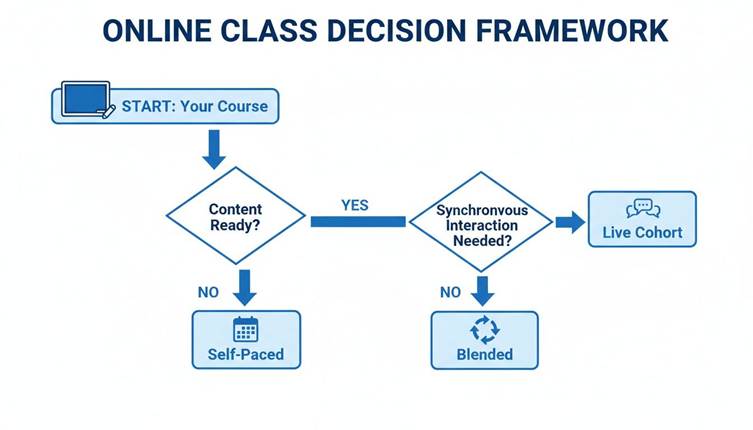
As the framework shows, your choice comes down to balancing student needs, like flexibility, with your own goals for the course, like fostering a strong community. Picking the right delivery format creates the ideal structure for how your online classes are conducted, setting everyone up for a successful experience.
The Essential Toolkit for Your Digital Academy
Alright, we’ve covered the "why"—now let's get into the "how." It's time to assemble the digital toolbox you'll need to run your online classes like a professional.
Think of it like setting up a workshop. You need the right tools in the right places for everything to run smoothly. Without a solid toolkit, even the most brilliant course content can fall flat.
A seamless learning experience really boils down to three core areas: how you deliver content, how you interact live, and how you keep students engaged. You could try to patch together different services for each, but an all-in-one platform acts as your central command center. It simplifies your workflow and creates a single, unified home for your students.
This integrated approach is quickly becoming the standard. The Indian EdTech industry, valued at Rs. 1,10,198 crore in 2024, is on track to rocket past Rs. 5,29,384 crore by 2035. That explosive growth shows a huge demand for high-quality, structured online learning—something scattered, free content just can't provide.
Core Platform Features You Cannot Skip
When you're looking at platforms and figuring out how online classes are conducted, some features are simply non-negotiable. These are the foundations that make your digital academy functional, professional, and ready for business. Arming your academy with the right educational technology tools for teachers isn't just a nice-to-have; it's essential for creating a learning space that actually works.
Your checklist must include:
A No-Code Website Builder: This lets you create a beautiful, branded storefront for your academy without ever having to write a single line of code.
Secure Video Hosting: Your platform must securely host and stream your lessons, shielding them from being downloaded without permission.
Integrated Payment Gateways: Let students pay you easily through credit cards, UPI, and other popular methods, all without sending them to a third-party site.
Course Creation Tools: You need an intuitive dashboard for uploading content, structuring your modules, and building quizzes and assignments.
These features are the backbone of your entire operation. They handle all the technical heavy lifting, freeing you up to do what you do best: teach.
Tools for Engagement and Support
Let’s be honest: a great online class is an interactive one. If students are just passively watching videos, they're going to drop off. Your toolkit has to include features designed to keep them motivated, supported, and connected. This is how you turn a simple course into a thriving learning community.
The most powerful tool in an online course isn't the content itself, but the connection students feel—to the material, to the instructor, and to each other. Your platform should enable and amplify these connections at every turn.
Look for tools that automate support and encourage interaction. An AI Teaching Assistant is a game-changer here. It acts as a 24/7 guide, instantly answering student questions using your own course material. This dramatically cuts down your support time while giving learners the immediate help they need to get unstuck and stay on track.
If you're looking for a platform that bundles all of these essential course creation and management features into one cohesive system, it's worth a look.
Protecting Your Intellectual Property
Finally, your toolkit absolutely must have robust security measures. Your course content is your most valuable asset, and protecting it is critical if you want to build a sustainable business. Think of these features as the digital locks and alarms for your academy.
Your platform should give you multi-layered security:
Digital Rights Management (DRM): This is encryption technology that stops people from illegally copying and sharing your video content.
Dynamic Watermarking: This overlays student-specific information onto videos, making it a powerful deterrent against screen recording and sharing.
Domain Restriction: This ensures your content can only be viewed from your official academy website and nowhere else.
These security features work silently in the background, giving you the peace of mind to know your hard work is protected and generating revenue only for you.
Crafting an Unforgettable Learning Experience

Let’s be honest. A truly great online class is so much more than just a folder of videos and a PDF download. That’s like handing someone a textbook and just hoping for the best.
To show your students how online classes are really conducted, you need to think like an experience designer, not just a content uploader. Your job is to build a journey that pulls them in, sparks their curiosity, and keeps them showing up. When students feel seen, supported, and part of something bigger, the learning just clicks.
The data backs this up. In India, for example, online learning often drives better engagement and retention than a traditional classroom ever could. Globally, we see online learner retention rates hitting as high as 60%—a massive jump from the 8-10% you often find in face-to-face settings.
Fostering a Vibrant Learning Community
Isolation is the number one killer of online courses. No one wants to feel like they're learning in a vacuum. A strong community turns a lonely activity into a shared adventure, which is a non-negotiable part of how modern online classes are conducted.
Building this doesn't have to be complicated. It all starts with creating dedicated spaces for students to connect.
Discussion Forums: Set up specific threads for each module. This gives students a place to ask questions, share their "aha!" moments, and help each other out.
Live Q&A Sessions: Jump on a live call regularly. It puts a face to the name, makes you more approachable, and clears up confusion in real-time.
Peer-to-Peer Feedback: Encourage students to review each other's assignments. This creates a collaborative vibe and reinforces learning from multiple angles.
These simple touchpoints make students feel like they’re on a team, and that’s a powerful reason to keep going.
Making Learning Fun with Gamification
Another fantastic strategy is gamification—using game-like elements in your course. This taps into our natural drive for achievement and a little friendly competition, making the whole process feel less like work and more like play.
Instead of just slogging through lessons, students can start earning achievements. It's a small mental shift that makes a huge difference. Of course, for any of this to work, your content has to be top-notch. That means you need to remove background noise from video for flawless audio so your lessons are crisp and professional.
Gamification isn’t about turning your course into a video game. It’s about using proven psychological triggers—like progress, achievement, and recognition—to keep learners invested in their own success.
Here are a few popular gamification ideas you can implement right away:
Badges: Award a digital badge when a student finishes a tough module, aces a quiz, or is super helpful in the forums.
Leaderboards: A simple leaderboard showing top performers can ignite a friendly sense of competition and motivate everyone to step up their game.
Progress Bars: Nothing is more motivating than seeing that finish line get closer. A visual progress bar keeps students pushing forward to the next milestone.
Assessments and Certificates That Add Value
Finally, how you assess learning and recognize completion matters. A lot. Assessments shouldn't feel like a scary final exam. They should be tools that build confidence and lock in the key concepts you've taught.
Meaningful assessments can come in many forms:
Practical Projects: Ask students to apply what they've learned to a real-world task. This is where learning becomes skill.
Short Quizzes: Use quick, low-stakes quizzes after each video to help the information stick.
Reflective Journals: Have students write about their learning journey and how they plan to use their new knowledge.
Once they cross the finish line, a branded certificate gives them a tangible reward for all their hard work. It's not just a digital file; it's a shareable credential that proves their new skills and makes your course feel far more valuable. For more ideas on this, check out our guide on proven tips for creating a successful online course.
A Week in the Life of Your Online Class

It’s one thing to talk about delivery models and engagement tools. It’s another to see how it all comes together in a real week. Let's make this practical.
To give you a real feel for the flow, we'll walk through a typical week in a blended course. We’ll look at it through two lenses: first from your student’s point of view, and then from yours as the instructor pulling the strings.
This simple narrative shows you the rhythm of a well-run online class. You'll see how the right platform makes managing all the moving parts feel easy, letting you focus on what really matters: teaching.
The Student Experience: A Week in Action
For a learner in your blended course, the week isn't just a random collection of tasks. It's a structured journey designed for steady progress, mixing self-study with moments of connection.
Their week might look something like this:
Monday Morning: The student logs in and gets an automated notification outlining the week's plan. They dive right in, watching two pre-recorded video lessons you prepared, which cover the core ideas for the module.
Wednesday Afternoon: After letting the material sink in, they take a quick, automated quiz to check their understanding. They then pop into the community forum to ask a question about something from the video and get a fast reply from a classmate.
Friday Evening: The week builds towards a live group video session. Here, the student joins their cohort to discuss the topic, ask you questions directly, and work with a few peers in a small breakout room activity.
This blended rhythm gives students the freedom to learn on their own time, but with the accountability and human connection that keeps them on track.
The Instructor Experience: Behind the Scenes
Now, let's switch seats. As the course creator, your week is all about guiding that learning journey, checking on progress, and prepping for those key live interactions. A modern platform automates most of the grunt work, so your time is spent on high-impact activities.
Your week looks a little different:
Monitoring and Engagement: Throughout the week, you glance at the analytics dashboard to see who has watched the videos and finished the quiz. You also spend about 15 minutes each day in the discussion forum, stepping in to answer tricky questions and nudge the conversation forward.
Preparation and Communication: On Thursday, you scan the forum for common questions. These become your talking points for Friday’s live session. You then send out a weekly update email, reminding students about the call and celebrating a few "wins" from the community.
Live Session Delivery: Friday rolls around, and you host the one-hour live session. You lead the main discussion and facilitate the breakout groups. Once it's over, the recording is automatically uploaded to the platform for anyone who couldn't make it.
Your role shifts. You're no longer a traditional lecturer; you’re a facilitator and a guide. The platform handles the admin, freeing you up to mentor, give feedback, and build a real learning community.
This weekly flow is how modern online classes are conducted—in a dynamic, organized way. It’s a sustainable rhythm that creates a rich experience for your students without burning you out. The secret is having a system that ties it all together seamlessly.
Monetizing and Scaling Your Teaching Business
Let's be honest. Teaching online is more than just a passion project—it's the foundation of a real business. To go from a single course to a thriving digital academy, you need a smart plan for making money and growing. This means thinking about payment models, building a brand people trust, and using data to make better decisions.
This is the point where you stop just teaching content and start building a scalable asset. Let's break down the key pieces that turn your expertise into a sustainable business, showing you how successful online classes are really run from the inside.
Choosing Your Payment Models
How you charge for your course has a massive impact on your income and your students' decision to sign up. You don't have to pick just one method; in fact, offering a few different options is the best way to attract the widest possible audience.
Here are the three most common ways to structure your payments:
One-Time Purchase: This is the simplest way to go. Students pay a single, upfront fee and get lifetime access to your course. It's clean, straightforward, and perfect for foundational courses that don't change much over time.
Subscriptions or Memberships: With this model, students pay a recurring fee—usually monthly or yearly—for access to your content, community, or ongoing updates. This creates a predictable, steady stream of revenue for you and gives learners a reason to stick around.
Payment Plans: This is a game-changer for accessibility. A payment plan breaks up a larger one-time fee into smaller, more manageable monthly instalments. It dramatically lowers the barrier to entry for students who can't pay the full price at once, making your high-value courses available to more people.
The Power of White-Label Branding
As you grow, you want your students to feel like they are in your world, not just using some generic platform. This is where white-label branding becomes absolutely critical. Think of it as building your own custom-designed shop instead of just renting a small booth in a giant, crowded market.
White-labelling lets you strip away all third-party logos and use your own colours, your own domain name, and your own branding across every single part of your academy. It instantly tells students they've arrived at your professional institution, building trust and credibility from the moment they land on your site.
This control touches everything, from the course dashboard your students see every day to the branded certificates they proudly share after completion. It solidifies your identity and turns a simple collection of courses into a professional, recognizable online academy.
Using Analytics to Fuel Growth
To scale your business, you can't just guess what's working. You need cold, hard data. Analytics are your behind-the-scenes look at how students are actually using your courses, showing you exactly what keeps them hooked and where they might be getting stuck.
A good platform gives you a clear dashboard with the most important numbers:
Completion Rates: See which lessons or modules have the biggest drop-off rates. This is your cue to figure out if that content is too hard, too long, or just plain boring.
Quiz Performance: Quickly understand which topics your students are nailing and which ones need to be explained differently. This feedback is gold for improving your teaching.
Student Engagement: Track who's participating in forums, how often they're logging in, and who's falling behind. It gives you a real-time pulse on the health of your learning community.
By keeping a close eye on this data, you can constantly refine your courses, improve student results, and make smart, informed decisions that push your business forward. Understanding the pricing models available for course platforms is a great next step in mapping out your financial strategy. This is how the most successful online classes are run—with a sharp focus on both teaching quality and business growth.
Frequently Asked Questions
As you get ready to launch your digital academy, a few practical questions always pop up. Getting straight answers is key to understanding how online classes actually work from a business perspective. Here are the answers you need to move forward with confidence.
How Do I Protect My Course Content from Piracy?
Protecting your intellectual property isn't optional—it’s essential for building a sustainable teaching business. Think of your course videos and materials as valuable assets you need to lock in a digital vault. Your best defense is a platform with built-in security that acts as your virtual guard.
A multi-layered approach works best:
Digital Rights Management (DRM): This tech encrypts your video content, making it incredibly difficult for anyone to copy or download your lessons without authorization.
Secure Streaming: This ensures your videos are delivered through a protected channel, stopping screen-capture software in its tracks.
Domain Restrictions: This feature is like a digital fence, allowing your courses to be viewed only on your official website and nowhere else.
These tools work silently in the background, giving you peace of mind that your hard work is secure and making money only for you.
Do I Need to Be a Tech Expert to Conduct an Online Class?
Absolutely not. This is one of the biggest myths holding talented creators back. In the past, you might have needed to wrestle with clunky software, but modern all-in-one platforms have completely changed the game.
Today's tools are designed for educators, not developers. They come with intuitive drag-and-drop website builders and simple dashboards for uploading content and managing students. This user-friendly design means you can focus 100% of your energy on what you do best: creating amazing course material and connecting with your learners. The technology should support your teaching, not become a frustrating roadblock.
What Is the Best Way to Handle Student Questions?
Supporting your students is critical for their success, but it can quickly become overwhelming if you're not careful. Traditional methods like forums and email have their place, but they often lead to slow replies and repetitive work for you.
A far better solution is an AI Teaching Assistant. This isn't just a generic chatbot; it's an AI trained exclusively on your course content. It gives instant, accurate, and context-aware answers to student questions 24/7.
An AI assistant is a force multiplier for your support. It gives students the immediate help they need to stay engaged and overcome learning hurdles, while slashing your support workload so you can focus on high-value interactions.
How Much Can I Really Earn from an Online Course?
The earning potential here isn't like a fixed salary—it’s a scalable business model. Your income isn’t capped and can grow substantially as you refine your courses and reach a wider audience. There's no single answer, as your revenue will depend on several key factors.
Your earnings are influenced by:
Your Niche: How specialized and in-demand is your topic?
Audience Size: How many people can you reach with your marketing?
Pricing Strategy: Are you offering a high-ticket program or a lower-priced entry course?
Marketing: How well can you communicate the value your course provides?
Many creators start with one course and eventually build a full-fledged academy, creating a reliable and growing income stream from their expertise.
Ready to build your own professional online academy with powerful tools and complete brand control? Skolasti provides everything you need, from a no-code website builder and robust content protection to an AI Teaching Assistant that handles student support for you. Launch your academy today!